


Key Takeaways
- Engine vs brand: The provider runs scanning, filing, and re-checks, while the partner owns the brand, price, and customer.
- Brokers resist: In a 2026 UC Irvine study, 70% of California brokers never sent the required deletion answer.
- Two request types: Opt-outs stop sale within 15 business days, while deletions erase records within 45 days.
- Six steps: Enrollment, discovery, filing, status tracking, verification, and monthly re-checks run as one loop.
- Proof sells renewals: Source, date, and screenshot evidence lets support answer disputes and show value at renewal.
A partner that sells data broker removal sells an outcome, not a feature. When a listing stays up, the customer blames the brand on the invoice. Meanwhile, the engine underneath stays invisible.
That outcome depends on brokers who often do not cooperate. In 2026, UC Irvine researchers sent deletion requests to every California-registered broker they could reach. Seventy percent of those brokers never sent the answer the law requires. For a partner, each silent broker becomes a support ticket, a refund request, or a lost renewal.
This guide explains how white label data broker removal works from the partner side. It covers the request types, the six-step workflow, the deployment paths, and the split of work after launch.
What White Label Data Broker Removal Means for a Partner
White label data broker removal is a service one company runs and another company sells under its own name. In short, the provider owns the engine. The partner, in turn, owns the brand.
The engine handles four jobs for every enrolled user:
- Finding listings across people-search and broker sites
- Filing opt-out and deletion requests through each site’s own process
- Tracking each request to a final status
- Re-checking for listings that come back
The partner never touches broker forms, CAPTCHAs, or email threads. Instead, the partner sees statuses, evidence, and reports under its own brand.
Why Data Broker Removal Is an Operations Problem
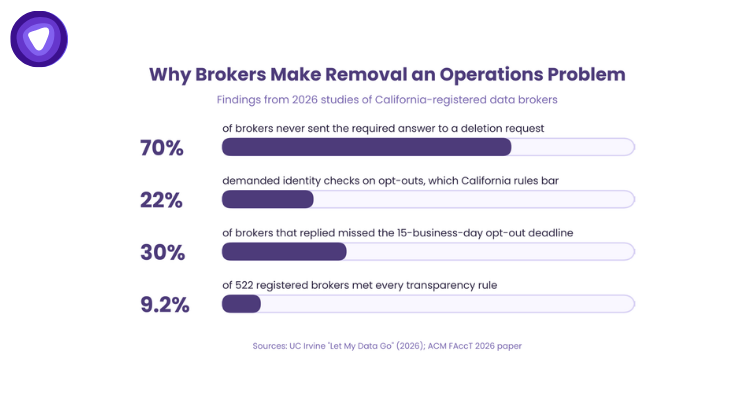
On the surface, removal looks like a single button in a privacy app. Behind that button sits a long queue of brokers, and each one follows its own rules. Three findings show why partners rent this engine instead of staffing it.
Brokers Do Not Follow One Process
The UC Irvine study shows how uneven the broker side is. Most brokers accepted requests through web forms, and many forms added CAPTCHAs. Others, by contrast, accepted email only. In addition, some demanded Social Security numbers or cookie values before they would act. The researchers dropped 85 brokers from the deletion test for that reason alone.
Opt-outs carried their own friction. California rules bar identity checks on opt-out requests. Even so, 22% of brokers demanded identity verification anyway. Among brokers that replied, 30% missed the 15-business-day opt-out deadline.
Compliance Gaps Are Common
A separate 2026 paper at the ACM FAccT conference reviewed 522 registered California brokers. Only 9.2% were fully compliant with transparency rules. The same researchers also audited the request flows of 250 brokers. In that audit, 43% made it impossible to use every required privacy right. Meanwhile, 64% added at least one design feature that created real friction.
The Manual Math Does Not Scale
Finally, manual filing time shows the size of the problem. The UC Irvine team spent about 4.6 minutes per broker on each deletion request. At that pace, one person across 400 sites needs roughly 31 hours per removal round.
Now take a partner with 5,000 enrolled users. The figures below are illustrative, not data from any partner.
- One full removal round: about 153,000 staff hours
- Monthly re-checks: a new load every cycle for listings that return
- Follow-ups: most brokers never confirm deletion, so someone must check each listing again
No partner staffs that queue. As a result, the real choice sits between a removal engine and no removal product at all.
Opt-Out vs Deletion: The Request Types Behind White Label Data Broker Removal
Many teams treat opt-out and deletion as the same request. Under California law, they are two different requests with different rules. The engine has to pick the right one for each broker and each user.
| Factor | Opt-Out Request | Deletion Request | California DROP Request |
| What it does | Stops sale and sharing; the broker may keep the record | Erases the record | Sends one deletion request to every registered California broker |
| Identity verification | Not allowed under California rules | Required before the broker acts | Handled by the state at sign-up |
| Legal deadline | 15 business days | 45 calendar days, with one 45-day extension | Brokers pull lists every 45 days; status can take up to 90 days |
| Who can use it | Anyone, on behalf of a consumer | The consumer or an authorized agent | California residents only |
| Role in a partner service | Filed and tracked by the engine | Filed, verified, and tracked by the engine | Complements a partner service; does not replace it |
In practice, the difference shapes what a partner can promise. An opt-out stops the sale of a record, but the broker may keep it on file. A deletion erases the record, but it needs identity checks first. Good routing files whichever request type each site supports and each user’s location allows.
California also runs a free state platform for residents. It reaches registered brokers only, so national coverage still needs a partner service. Our breakdown of Delete Act penalties covers the enforcement side.
How White Label Data Broker Removal Works, Step by Step
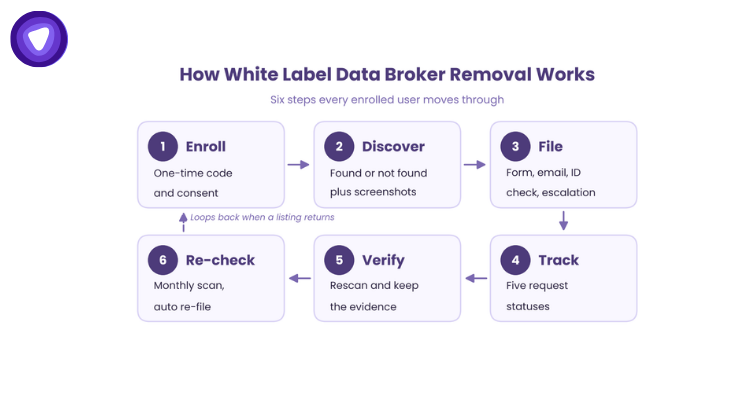
From the partner side, every user moves through the same six steps. Each step hands its output to the next one. Together, they turn a broken broker process into a predictable product.
Step 1: Enrollment and Consent
The user signs up inside the partner app or branded dashboard. Next, a one-time code confirms the user owns the email on file. The user then gives consent for the service to act on their behalf.
Meanwhile, broker matching needs only a name and location details. That short list matters, because extra data slows every request and widens the privacy review. The consent copy carries the partner brand and voice.
Step 2: Discovery Scan
The scan checks each supported site and returns a found or not-found result per listing. Then an evidence scan captures listing details and screenshots. As a result, this baseline shows the user what exists before any removal starts. It also gives support agents a record to answer from later.
Step 3: Opt-Out Filing
Next, the engine files a request with each broker that lists the user. Each broker gets the path it accepts:
- An online opt-out form
- An email request
- An identity verification step, where the broker requires one
- Manual escalation when a form breaks or a broker stops replying
Some sites offer no opt-out at all. In those cases, the evidence log still records the listing, so the user knows where it sits.
Step 4: Status Tracking
After filing, every request moves through a fixed set of states:
- Submitted: the broker has the request
- In progress: the broker is matching records
- Pending verification: the broker wants an extra confirmation
- Completed: the broker confirmed removal
- Re-listed: the record came back, and a new request opened
Partners on the API path receive these changes by webhook or by polling. Webhooks update the partner interface as soon as a status changes. Polling suits teams that sync on a fixed schedule.
Step 5: Verification and Evidence
A completed status still needs proof. So the engine rescans each listing and confirms whether it came down. In addition, each finding keeps its source, date, and screenshot.
That evidence trail does two jobs for a partner. First, support agents answer disputes from the report instead of guessing. Second, the renewal email can show exactly what changed during the year.
Step 6: Monthly Re-Checks and Re-Runs
Brokers refill their databases from public records and resold data. As a result, a removed listing can return within months. The engine re-checks supported sites monthly and files a new request when a listing reappears. As a result, the user opens no ticket, and the partner team does no manual work.
Three Deployment Paths for Partners
Partners choose how much of the front end they want to build. Every path runs on the same scanning and removal engine underneath.
- Full white label platform: a hosted, branded dashboard with reports and opt-out management. It needs no front-end build, so it suits partners that want the fastest launch.
- Modular API and SDK: removal runs inside the partner’s own interface. Most SaaS teams embed it through the API and SDK to keep users inside the product.
- Hybrid: monitoring sits in the partner app, while a hosted dashboard handles removal. Partners pick the build split for each surface.
In practice, speed to launch follows build scope. The hosted path is fastest, while API projects depend on how much interface the team builds.
Who Owns What After Launch
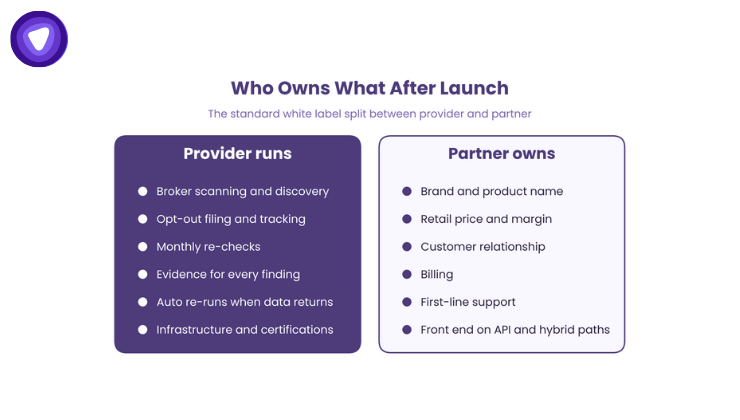
Clear ownership keeps support tickets from bouncing between two companies. In a standard white label split, the work divides into three areas.
What the Provider Runs
- Broker scanning and listing discovery
- Opt-out filing, status tracking, and monthly re-checks
- Evidence capture for every finding
- Automatic re-runs when removed data returns
- Infrastructure, uptime, and security certifications
What the Partner Owns
- Brand, product name, and retail price
- The customer relationship and billing
- First-line support for end users
- The front end on API and hybrid paths
When a Broker Does Not Cooperate
Brokers ignore requests, reject them, or change forms without notice. In each case, the engine retries and logs every attempt. If a user disputes a result, the partner agent answers from the source and date on the report. Engine issues go to the provider’s partner team, not the partner’s engineers.
No provider can promise that every trace disappears. A provider can prove every request it filed, and partners should ask for that proof. Our checklist on how to evaluate a provider lists the questions to ask before signing.
How Partners Price and Package Removal
The commercial model mirrors the technical one. The partner buys removal at wholesale and sets its own retail price. In turn, the gap between the two is the partner’s margin.
Most partners package removal in one of three ways:
- A free discovery scan in the base plan, with removal in a paid tier
- Removal bundled into a premium plan to lift its value
- A standalone privacy product under the partner brand
Removal also renews well, because brokers keep re-listing data. Our analysis of recurring revenue shows how that loop supports a subscription.
Partner vs Refer: Why Ownership Matters
Some platforms skip the build and point users to a third-party consumer removal service. That choice looks cheap, but it hands away three assets:
- The revenue from each removal subscription
- The brand relationship, since the user now trusts another name
- The retention benefit, because the renewal value sits outside the product
White label data broker removal keeps all three inside the partner product. As a result, the user sees one brand, one bill, and one support team.
How PureVPN White Label Data Broker Removal Supports Partners
PureVPN White Label Data Broker Removal scans 400+ people-search and broker sites. It files opt-outs where each site allows, tracks them to status, and re-checks monthly. In addition, every finding carries listing details and screenshots. Partners launch it as a hosted platform, an API and SDK, or a hybrid.
The platform holds SOC 2 Type II and ISO 27001 certification, with audit reports shared under NDA. The 400+ site and 150+ partner figures are PureVPN’s own reported data, not third-party audited. Partners can also add dark web monitoring as a separate line at any time. The platform page shows each deployment path in detail.
Conclusion: White Label Data Broker Removal Is an Operation You Rent
White label data broker removal works because the hardest part stays with the provider. After all, brokers use different forms, ignore requests, and re-list data. The engine absorbs that work, while the partner keeps the brand, the price, and the customer.
For partners, the next step is choosing a deployment path and a launch plan. Our launch guide walks through scope, pricing, compliance language, and onboarding.
Request a 20-minute demo of the removal workflow under your brand.