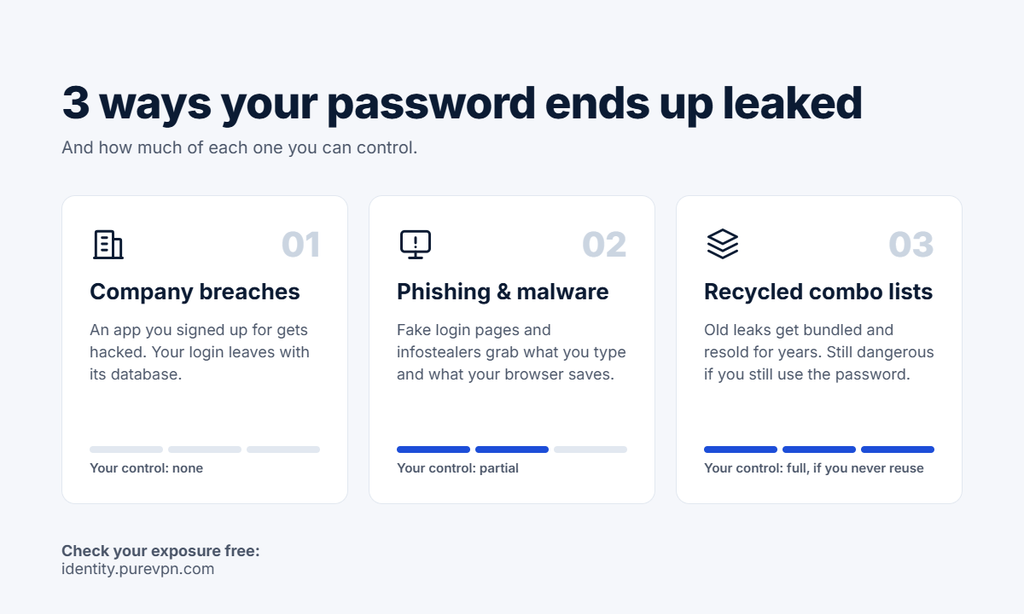
If you have been online for more than a few years, at least one of your passwords has probably leaked already. It is the normal result of having accounts at dozens of companies, any one of which can be breached.
So the useful question is not “has my password leaked?” It is: where did it leak, what was it paired with, and does it still open anything today? This guide answers those three questions, and redefines what “preventing” a password leak actually means.
Don’t Let Cybercriminals Turn You Into a Bestseller.
Enter your email below to scan for any breaches or leaks on the dark web instantly.
A Leaked Password Is Rarely Just a Password
Leaked passwords are login credentials exposed to people who should not have them, usually through a company data breach, phishing, or malware, and then shared or sold online.
Leaks almost never contain a password on its own. They contain leaked credentials, an email address paired with a password, often alongside a phone number, username, or home address.
A real example: In July 2025, Tea, a dating-safety app with millions of users, confirmed that about 72,000 user images had leaked online, including 13,000 verification selfies and photo IDs, AP reported. Users had only signed up to an app. They never chose to publish their faces or ID cards.
That pairing is what makes a password leak dangerous. A random password is useless to an attacker. A password tied to your email is a key with your name on it. Attackers use your email address to connect leaks from different sites into one profile of you.
Has My Password Been Leaked? How to Check What’s Exposed
A proper password leak check starts with your email address, not your password. Your email is what ties every leaked record back to you.
PureVPN’s free exposure scan does exactly that. Enter your email and it searches breach sources, public records, and data broker sites, then gives you a complete exposure report showing:
Which breaches your email appears in
What leaked alongside it, such as passwords, phone numbers, usernames, or home addresses
Where your personal information is publicly listed online
The scan takes a minute and needs no credit card. Unlike browser warnings, it also shows the personal details that leaked alongside your passwords.
Your email could be compromised.
Scan it on the dark web for free – no signup required.
The Real Risk Is Reuse, Not the Leak
Attackers rarely log in by hand. They use credential stuffing: software that takes one leaked email-and-password pair and tests it on hundreds of sites in minutes. If the same password unlocks your email, bank, and shopping accounts, one leak becomes many.
One leaked password used on ten accounts is far more dangerous than ten leaked passwords that are each unique.
“This Password Has Appeared in a Data Leak”: What It Means
If Google Password Manager or the iPhone Passwords app shows this warning, it means that exact password was found in a known breach dataset. It does not necessarily mean someone has logged into your account. It does mean the password is now a compromised password, and you should treat it as public.
Take these warnings seriously. In workplace networks, employees are about four times more likely to be using an already-breached password than a weak one, Verizon’s 2026 DBIR found.
But browser warnings only show part of the picture. They check passwords saved in that browser or app. They do not tell you which breach exposed you, what personal details leaked with it, or whether your information sits on data broker sites.
Signs Your Account Has Already Been Compromised
These signs suggest someone is already using your leaked credentials.
Password reset emails you didn’t request
Someone may be trying to take over the account. If the reset came from your email provider, treat it as urgent, because your inbox is the key to everything else.
Two-factor codes you didn’t ask for
A 2FA code only gets sent after the correct password is entered. If you receive one out of nowhere, assume your password is known and change it immediately.
Login alerts from unfamiliar devices or locations
Most services email you about new sign-ins. A login from a city or device you don’t recognize is one of the clearest warning signs. To check yourself, open the Security section of your Google Account and review “Your devices,” or on iPhone go to Settings, tap your name, and scroll to see every device signed in with your Apple Account.
Messages, posts, or purchases you didn’t make
Sent emails you didn’t write, social posts you didn’t publish, or orders you didn’t place mean the account is actively being used.
Suddenly locked out
If your usual password stops working, someone may have already changed it. Use the service’s account recovery process right away.
What to Do in the First Hour After a Password Leak
Change your email password first. Whoever controls your inbox can reset almost every other account you own.
Change the leaked password everywhere you reused it, starting with banking and payment accounts.
Sign out of all active sessions so anyone already logged in is kicked out.
Turn on two-factor authentication (2FA), preferably an authenticator app rather than SMS.
Watch for phishing that mentions the breach. Attackers often follow a leak with fake “security alert” emails.
How to Prevent Password Leaks (What Prevention Really Means)
No one can stop a company they use from being breached. Practical prevention comes down to limiting how much damage a leak can do and finding out about it sooner.
Limit the damage
Use a unique password for every account, stored in a password manager.
Switch to passkeys wherever they are offered. A passkey stays on your device, so there is nothing to leak.
Turn on 2FA for email, banking, and social accounts.
Use a unique password for every account
This is the single change that defeats credential stuffing. A password manager makes it practical: it generates a long random password for each site, fills it in for you, and only warns you about the accounts that actually need attention. Start with the accounts that would hurt most if lost: your email, bank, and main social media.
Turn on two-factor authentication, and choose the right kind
2FA means a leaked password alone isn’t enough to get in. Authenticator apps and passkeys are stronger than text-message codes, because attackers can hijack your phone number through a SIM-swap scam and receive your codes themselves.
Use email aliases for sign-ups you don’t fully trust
Services like Apple’s Hide My Email or Firefox Relay give each site its own forwarding address. If one of those sites is breached, the leaked email can’t be linked to your other accounts, and you can switch off that alias.
Delete accounts you no longer use
That old dating app, forum, or shopping site still holds your data, and it can still be breached years after you stopped logging in. Closing dormant accounts shrinks how much of you is out there to leak.
Shorten the time to know
Most people learn about a leak only after something goes wrong. Continuous monitoring alerts you as soon as your details show up somewhere new. PureVPN’s Digital Privacy Protection sends real-time alerts when your credentials appear in new breaches or on dark web marketplaces, and tracks your exposure from one dashboard.
Frequently Asked Questions
Why is my iPhone telling me my passwords have been compromised?
Apple’s Passwords app checks your saved passwords against lists of known leaked passwords. If one matches, it is flagged as compromised. Apple runs this check without sending your actual passwords to its servers. The warning means the password is in a leak, not necessarily that someone has accessed your account.
Should I delete compromised passwords?
Not on their own. Deleting the saved entry removes the warning, but the leaked password still works on the account. Change the password on the website or app first, then update the saved entry.
What does it mean if your password is compromised?
It means the password appears in a breach dataset that attackers can access. Anyone with that list can try it on your accounts, and automated tools will test it across many sites. Treat it as public and replace it everywhere you used it.
Conclusion
You cannot stop the next breach. You can make sure it does not reach your other accounts, and that you hear about it first.