
Table of Contents
A breach count alone does not tell you much. If your details appear in several leaks, you need to know which information was exposed, where it came from, and what you can do about it to protect your accounts and personal information.
PureVPN’s Dark Web Monitoring checks for existing and new exposure. It displays breach details, risk levels, and recommended actions in an intuitive dashboard. Find out how the feature works and what happens when it finds a match below.
What Is PureVPN’s Dark Web Monitoring?
PureVPN’s Dark Web Monitoring is part of its Digital Privacy Protection offering. It searches known breach records and dark web sources for personal information linked to the details you add, such as your email address or social security number.
When it detects a match, the feature alerts you so you can review what was exposed and where the information came from. It also monitors for newly identified exposure, helping you stay informed about leaks discovered after your initial check.
How Does PureVPN’s Dark Web Monitoring Work?
You can manage the information being monitored and review detected breaches from the Dark Web Monitoring dashboard. Here is how the process works:
Step #1: Access Dark Web Monitoring
Open the PureVPN app and select Dark Web Monitoring. The feature is available with the Digital Privacy Protection plan. The dashboard shows your monitored information, an overall breach count, and whether any findings need attention.
Step #2: Add the Information You Want Monitored
Select Add beside the information you want to monitor. You can add an email address, phone number, credit card number, passport number, or Social Security/National Identity Number (SSN/NIN). After entering your details, accept the terms, save them, and complete verification using the code sent to your registered email address.
Step #3: PureVPN Checks for Exposed Information
PureVPN checks known breach records and dark web sources for matches involving your information. If it finds a match, the dashboard displays the number of detected breaches associated with your monitored details. New findings can also appear as further exposure is identified.
Step #4: Receive Alerts About Detected Exposure
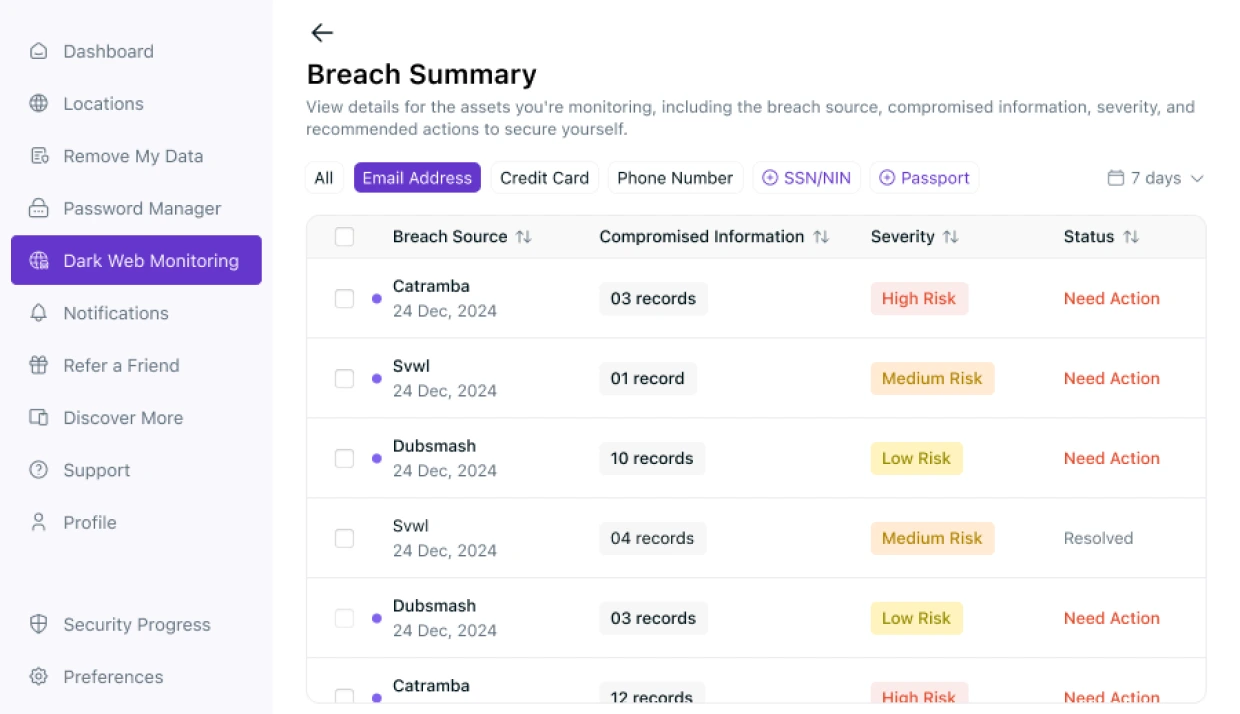
When PureVPN detects your details in a new breach, it alerts you so you can review the findings. It organises results by breach source, compromised information, severity, and status. You can open individual findings to see which details were exposed, read recommended security actions, and select Mark as Resolved once you’ve addressed the issue.
Don’t Let Cybercriminals Turn You Into a Bestseller.
Enter your email below to scan for any breaches or leaks on the dark web instantly.